Your existing touchpad driver stays in place.
No firmware changes, driver replacement, or exclusive device grab.
GNOME 50 · Wayland
Bring a familiar MacBook trackpad gesture to Ubuntu. Five Pinch adds five-finger pinch actions to Linux desktops running GNOME 50 on Wayland.
Gesture illustration · choose a direction to preview
Pinch to open your apps; spread to close the app grid. Choose an action for each direction and the sensitivity that feels right. You can also show the overview or reveal the desktop.
Set up your gestures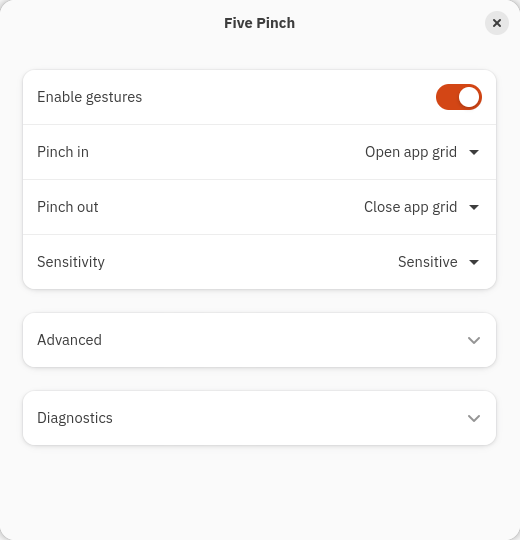
Free and open source under the MIT license. Install on GNOME 50 with Wayland; APT installs the required dependencies. Extension Manager is optional.
curl -fL https://nymeriq.github.io/five-pinch/setup-apt.sh -o /tmp/five-pinch-apt-setup.sh
sudo sh /tmp/five-pinch-apt-setup.sh
sudo apt update
sudo apt install five-pinch
Requires curl and gpg. Missing either?
Save your work first. Locking the screen is not enough.
A read-only reader tracks five fingertips. A GNOME extension turns a recognized pinch into your chosen action.
No firmware changes, driver replacement, or exclusive device grab.
Automatic rinertia protection filters leftover virtual scrolls around a five-finger interaction. Without rinertia, there is nothing to filter.
Disable gestures at any time. A reset command and package purge provide a documented path back.
It was tested on a 2017 MacBook Pro with an Apple SPI Touchpad, Ubuntu 26.04, GNOME 50, and Wayland. Other MacBooks and non-Apple touchpads are welcome to try it, but are not verified. Your touchpad must expose five independently tracked finger positions. Check the hardware requirements.
Five Pinch brings one familiar part of the Apple trackpad experience to Ubuntu: configurable five-finger pinch gestures. It began on a MacBook running Linux. It does not recreate every macOS multitouch gesture or provide continuous, finger-following app-grid animation. Set up five-finger pinch on Ubuntu.
A five-finger contact count does not necessarily produce a usable pinch event. Five Pinch reads the five contact positions directly and lets its GNOME extension perform your chosen action. It keeps your existing driver in place. See how gesture detection works.
Five Pinch adds configurable five-finger pinch actions. It does not add two-finger pinch-to-zoom. Optional protections suppress accidental swipe tails after a five-finger interaction and leftover rinertia scrolling; they do not globally change gesture sensitivity. Read about gesture protection.
Yes. Turn off Enable gestures to pause detection, or follow the reset and package removal steps to uninstall. Five Pinch does not replace drivers or firmware, or change rinertia configuration. Disable or uninstall Five Pinch.
Installation, every setting, compatibility, updates, and removal—in one place.